Many companies invest in a CRM expecting it to solve every customer management challenge in one go. And for a while, it usually does. The CRM that comfortably handled 100 leads, a handful of sales reps, and a simple follow-up process feels like exactly what the business needed.
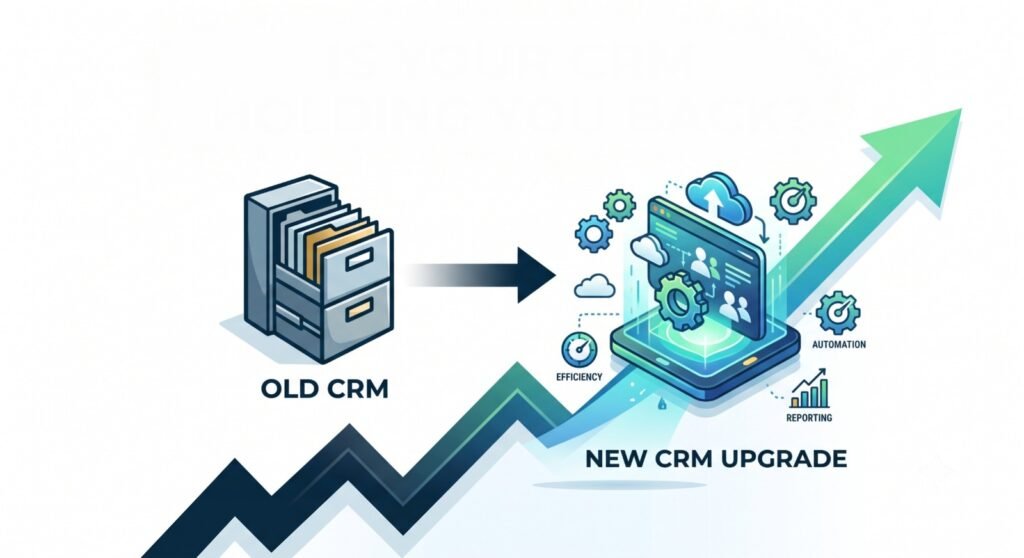
But businesses don’t stay the same size forever. As your contact list grows into the thousands, your sales team expands, and your workflows get more complex, that same CRM can quietly turn from an asset into a bottleneck.
So how do you know whether your business has actually outgrown its CRM?
Growth has a way of exposing the limitations in your systems, your processes, and your technology long before anyone admits it out loud. A CRM upgrade isn’t really about chasing the newest features on the market, it’s about removing the obstacles that are slowing your team down. Below are the clearest signs that it’s time to take a serious look at your current setup.
Why Businesses Outgrow Their CRM
Before getting into the warning signs, it helps to understand why this happens in the first place.
As a business grows, its requirements change in several ways:
- More leads and customer data flowing in from more channels
- Larger teams that need structured collaboration, not ad-hoc coordination
- Additional communication channels, from email to WhatsApp to social messaging
- Increased reporting needs, as leadership wants sharper, faster insights
- Greater automation requirements, because manual processes simply don’t scale
Here’s the key thing to understand: the problem is often not the CRM itself. It’s that the business has evolved beyond what the system was originally designed to handle. A tool built for a small, simple operation will always struggle once that operation becomes bigger and more complex, no matter how good it once was.
With that context in mind, here are the signs to watch for.
Sign 1: Your Team Relies on Spreadsheets Outside the CRM
When a CRM can’t fully support the way your team works, spreadsheets quietly become the real system of record. You’ll notice:
- Data being exported regularly “just to make sense of it”
- Opportunities being tracked manually in separate sheets
- Tasks and follow-ups being managed outside the CRM entirely
This is often one of the earliest signs of CRM limitations, and it’s more damaging than it looks. Every time information lives in two places, you risk duplicate data, human error, and a loss of visibility into what’s actually happening with your customers. If your “real” pipeline lives in a spreadsheet and your CRM is just for show, that’s a strong signal something needs to change.
Sign 2: Manual Work Is Taking Too Much Time
A modern CRM should be doing the repetitive work for your team, not adding to it. If your reps are still handling these manually, it’s worth paying attention:
- Manual lead assignment
- Manual follow-up reminders
- Repetitive data entry
- Manually updating records after every call or email
As teams grow, this manual overhead doesn’t scale , it multiplies. What used to be a minor inconvenience for two salespeople becomes a serious drag on productivity once you have ten. Automation isn’t a luxury at that point; it’s what keeps your team focused on selling instead of administrative busywork.
Sign 3: Your CRM Can’t Keep Up with Lead Volume
Sometimes the issue isn’t process , it’s raw performance. As inquiries increase and your customer database grows, some CRMs simply start to buckle:
- Pages load slower than they used to
- Searches and filters take longer to return results
- Storage limits start getting in the way
The business impact is real: delayed response times and missed opportunities, both of which directly affect revenue. A scalable CRM should grow alongside your business, not force you to work around its limits. If your system was fast when you had a few hundred contacts but crawls now that you have tens of thousands, that’s a capacity problem, not a user error.
Sign 4: Reporting Doesn’t Give Clear Answers
Good decisions depend on good data. When your CRM’s reporting can’t keep up, you’ll start to notice:
- Inconsistent reports that don’t match across teams
- Missing insights into where deals are actually stalling
- Little to no forecasting capability
Decision-making becomes genuinely difficult when leadership can’t trust the numbers in front of them. If your team spends more time reconciling reports than acting on them, your CRM isn’t giving you the visibility a growing business needs.
Sign 5: Important Tools Don’t Integrate Properly
Your CRM shouldn’t operate in isolation. As your tech stack grows to include email platforms, marketing tools, WhatsApp communication, and customer support systems, your CRM needs to connect with all of them smoothly.
When integrations are missing or unreliable, the result is:
- Data silos between departments
- Duplicate work as teams re-enter the same information
- A fragmented, inconsistent customer experience
Integration becomes increasingly important as businesses grow and add more channels for reaching customers. A CRM that can’t talk to the rest of your tools quickly becomes a liability rather than a hub.
Sign 6: Your Sales Process Has Become More Complex
Many businesses start with a simple, linear sales process , and a simple CRM handles that just fine. But growth tends to bring complexity:
- Multiple pipelines for different products, regions, or teams
- Multiple products or services with different sales cycles
- Team collaboration requirements across departments
- Approval workflows for pricing, discounts, or contracts
If your current CRM was built for a single, straightforward pipeline, it likely can’t flex to support this new level of complexity. Businesses eventually need far more configurability than they did on day one.
Sign 7: Your Team Avoids Using the CRM
This might be the most telling sign of all — and one of the easiest to miss until it’s a serious problem. Watch for:
- Low adoption rates across the sales team
- Employees keeping personal notes instead of updating the system
- Important information being stored elsewhere, in inboxes or notebooks
If your team is actively avoiding the CRM, the issue usually isn’t laziness , it’s usability, functionality, or a poor fit for how they actually work. A CRM that people work around instead of working within isn’t doing its job, no matter how many features it has on paper.
Sign 8: You Need Automation and AI Capabilities
CRM technology has moved fast in the last few years, and expectations have moved with it. Businesses increasingly need:
- Automated workflows that trigger without manual input
- Smart lead management and scoring
- Task automation across the sales and service cycle
- Predictive insights that flag risk and opportunity early
Modern CRM platforms are evolving well beyond simple contact management. AI and automation are quickly becoming competitive advantages — the businesses that adopt them are moving faster and closing more efficiently than those still doing everything by hand.
Sign 9: Your CRM Is Limiting Growth Instead of Supporting It
At some point, all of the smaller signs add up to one bigger question. Ask yourself:
- Are workarounds becoming the normal way of doing things?
- Is your team spending more time managing systems than managing customers?
- Are opportunities being missed because of process gaps the CRM should be closing?
When your technology creates friction instead of removing it, that’s the clearest signal of all. A CRM’s job is to support growth — when it starts holding growth back instead, it may be time for a change.
What to Look for in a CRM Upgrade
Rather than jumping straight to a solution, it’s worth stepping back and evaluating what your business actually needs from its next CRM. Look for:
- Scalability — room to grow without hitting a ceiling
- Automation — built-in tools that reduce manual work
- Ease of use — a system your team will actually adopt
- Reporting capabilities — clear, trustworthy insights for decision-making
- Integration support — smooth connections with your existing tools
- Security — protection for growing volumes of customer data
- AI capabilities — forward-looking features that keep you competitive
These considerations align closely with where CRM buying decisions are heading across most industries right now.
Choosing a CRM That Can Grow With Your Business
This is where a platform like Bitrix24 fits naturally into the conversation. Rather than functioning as a standalone contact database, Bitrix24 combines CRM with broader business management , workflow automation, team collaboration, task and project management, and communication tools, all in one place.
For a growing business, that combination matters. Instead of stitching together several disconnected tools, teams get a single platform that can scale alongside their pipelines, their headcount, and their reporting needs. It’s not about chasing the newest trend — it’s about having a system flexible enough to support the business you’re building, not just the one you started with.
Choosing the right platform is only half the equation, though. How it’s configured, automated, and rolled out to your team matters just as much as the software itself. This is where working with a certified implementation partner makes a real difference. SarasUK, a certified Bitrix24 Gold Partner, helps growing businesses set up Bitrix24 around their actual sales process — custom pipelines, automation rules, and reporting dashboards — rather than forcing the team to adapt to a generic, out-of-the-box setup. That kind of tailored configuration is often what determines whether a CRM upgrade actually solves the problems outlined above, or just becomes a more expensive version of the same one.
Final Thoughts
The best time to upgrade a CRM is before growth starts to suffer, not after.
It’s easy to focus on hiring more people or increasing marketing spend when things feel stuck. But often, the real bottleneck isn’t effort — it’s an outdated system quietly working against the team using it. A modern CRM should help your people work smarter, move faster, and stay ready for whatever growth comes next.
If several of the signs above sound familiar, it may be time to take a closer look at what your CRM is — and isn’t — doing for your business.
If you’re weighing whether Bitrix24 is the right fit and want a clear-eyed audit of your current setup before committing to anything, the team at SarasUK offers a free CRM consultation to help you figure out the right path forward — whether that’s a full migration, a reconfiguration, or targeted fixes to what you already have.