Bitrix24 project management in short
Bitrix24 handles project management in one platform: you assign tasks with deadlines and responsible people, track work on Kanban boards or Gantt charts, and collaborate through built-in project chat, file sharing and video calls. Tasks link directly to the CRM, so projects stay connected to clients and deals. Kanban and Gantt are available on the free plan; time tracking and automation need a paid plan.
In today’s fast-paced business landscape, effective project management is the backbone of organizational success. With teams often spread across locations and time zones, tools that centralize tasks, foster collaboration, and provide real-time insights are more critical than ever. Enter Bitrix24—a versatile, all-in-one platform that promises to simplify project management while integrating seamlessly with other business functions. But what makes Bitrix24 stand out in a crowded field of project management solutions? Let’s dive into its features, benefits, and practical applications to find out.
What is Bitrix24?
Bitrix24 is more than just a project management tool—it’s a comprehensive workspace designed to handle everything from task tracking to customer relationship management (CRM), team communication, and even website building. Launched in 2012 by Bitrix Inc., the platform has evolved into a robust solution used by over 15 million organizations worldwide. While it’s often pigeonholed as a CRM, its project management capabilities are a major draw for teams seeking an affordable, feature-rich alternative to standalone tools like Asana, Trello, or Monday.com.
Available in both cloud-based and on-premise versions, Bitrix24 caters to businesses of all sizes. Its free plan includes the core task tools, including Kanban and Gantt views, which makes it a good starting point for small teams. Paid plans add time tracking, task automation, more storage and unlimited projects.
Core Project Management Features
Bitrix24’s project management suite is built to handle the full lifecycle of a project, from planning to execution to review. Here’s a breakdown of its standout features:
- Unlimited Tasks and Projects
Whether you’re juggling a single initiative or dozens of complex projects, Bitrix24 lets you create unlimited tasks and subtasks. You can assign them to team members, set deadlines, and attach files or checklists—all within a single interface. - Multiple Visualization Options
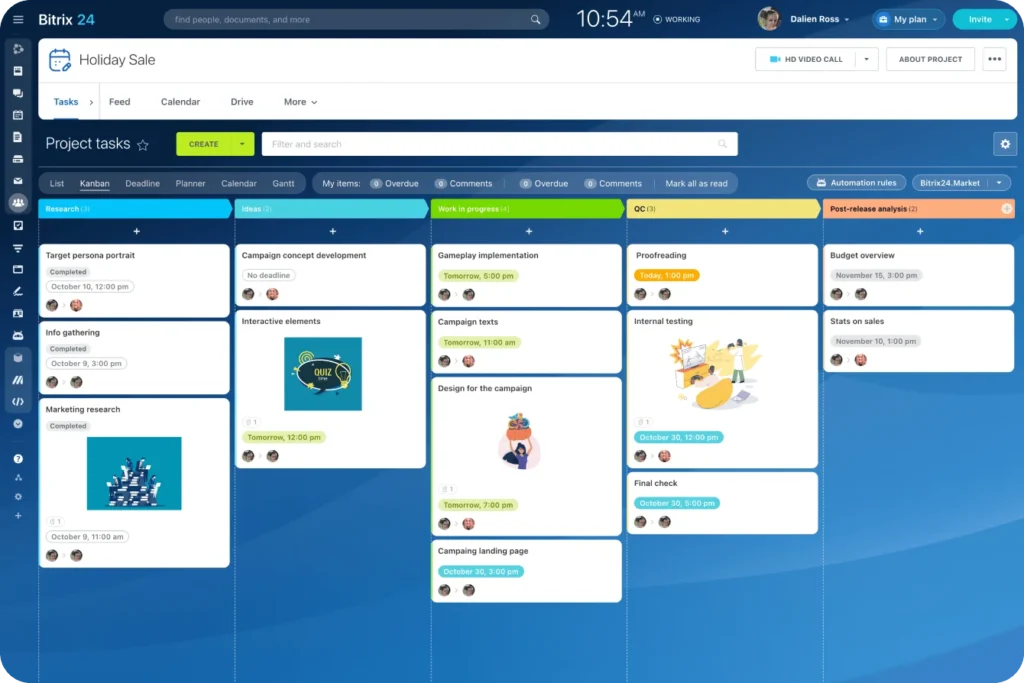
Flexibility is key in project management, and Bitrix24 delivers with a variety of views to suit different workflows. Gantt charts offer a timeline-based overview with task dependencies, while Kanban boards provide a visual, stage-by-stage breakdown. There’s also a calendar view, a simple list, and even a Scrum framework for Agile teams. - Collaboration Tools
Teamwork thrives on communication, and Bitrix24 integrates it directly into the platform. Each project gets its own chat, file storage, and video conferencing tools, allowing team members to discuss tasks in real time. You can also invite external collaborators—like clients or freelancers—without leaving the ecosystem. - Time Tracking and Workload Management
On paid plans, Bitrix24 includes time-tracking features to compare planned versus actual time spent on tasks. Managers can monitor employee workloads, generate detailed reports, and ensure resources are allocated efficiently. - Automation and AI Assistance
On paid plans, routine tasks such as sending notifications or updating statuses can be automated to save time. Plus, Bitrix24’s AI assistant, CoPilot, can generate task descriptions, summaries, or checklists based on simple prompts, adding a layer of efficiency to planning. - Mobile Accessibility
With a fully functional mobile app (available for iOS and Android), Bitrix24 ensures you can manage projects on the go. Create tasks, track progress, and stay connected with your team from anywhere.
What the Bitrix24 free plan includes for project management
The free plan is designed for small teams getting started. For project management it includes:
- Tasks and subtasks with deadlines, assignees and checklists
- Kanban boards and Gantt charts
- Project chat, file sharing and video calls
- 5 GB of online storage
Paid plans add task time tracking and task automation (Professional plan and above), unlimited projects and boards (Standard and above), more storage and more users. Plan limits change from time to time, so confirm current details on Bitrix24’s pricing page.
Benefits of Using Bitrix24 for Project Management
Bitrix24’s all-in-one approach offers several advantages over traditional project management tools:
- Cost-Effectiveness: The free plan covers the basics (tasks, Kanban and Gantt), and paid plans add advanced features as you grow. Because CRM, chat and project tools come in one subscription, many teams replace several separate tools. Check Bitrix24’s pricing page for current plan limits.
- Integration with CRM: Unlike standalone tools, Bitrix24 ties project management to client data. You can generate project estimates, track client interactions, and send invoices without switching platforms.
- Customization: From access permissions to Kanban stages, Bitrix24 lets you tailor the system to your team’s needs. The on-premise version even offers open-source code for deeper customization.
- Scalability: Whether you’re a solo entrepreneur or a multinational enterprise, Bitrix24 scales with you, offering plans that support anywhere from 5 to 250+ users.
Real-World Applications
Bitrix24 shines across industries. For a small marketing agency, it can manage campaigns with Kanban boards, track client leads via CRM, and store creative assets in the cloud, starting on the free plan. A construction firm might use Gantt charts to schedule phases, allocate resources with workload tools, and communicate with subcontractors via group chats. Even remote teams benefit from the mobile app and video call features, keeping everyone aligned regardless of location.
Take Velesstroy, a construction company with over 25,000 employees. By integrating Bitrix24 with their employee management systems, they streamlined payroll, labor cost planning, and task coordination—an example of how the platform adapts to large-scale operations.
Potential Drawbacks
No tool is perfect, and Bitrix24 has its quirks. The sheer number of features can overwhelm new users, leading to a steeper learning curve than simpler alternatives like Trello. Some report the interface feels cluttered, and occasional performance lags have been noted on the free plan. For teams needing highly specialized project management (e.g., advanced Agile features), Bitrix24 might lack the depth of tools like Jira.
How to Get Started
Getting up and running with Bitrix24 is straightforward:
- Sign up for a free account at Bitrix24.com.
- Invite your team and set access permissions.
- Create your first project, add tasks, and choose your preferred view (e.g., Gantt or Kanban).
- Explore integrations—like Google Drive or Zoom—to enhance functionality.
- Use the built-in help resources or YouTube tutorials to master the platform.
Final Thoughts
Bitrix24 isn’t just a project management tool—it’s a Swiss Army knife for business operations. Its blend of task management, collaboration, and CRM features, paired with a generous free tier, makes it a compelling choice for teams looking to consolidate their workflows. While it may take time to navigate its extensive capabilities, the payoff is a unified platform that grows with your business. Whether you’re launching a startup or optimizing a sprawling enterprise, Bitrix24 offers the tools to turn chaos into progress—one task at a time.
Need help setting up Bitrix24 for your projects? Sarasuk Tech, an official Bitrix24 Gold Partner, configures projects, task workflows and automation around how your team works. Book a free Bitrix24 demo.
Frequently asked questions
How does Bitrix24 handle project management?
Bitrix24 lets you create projects and tasks, assign them to team members with deadlines, and track progress in Kanban, Gantt, list or calendar views. Each project has its own chat, files and video calls, and tasks can be linked to CRM deals and clients.
Does the Bitrix24 free plan include Kanban boards and Gantt charts?
Yes. The free plan includes tasks with Kanban and Gantt views. Time tracking and task automation are only available on paid plans.
Can Bitrix24 replace tools like Trello, Asana or Monday.com?
For most small and mid-sized teams, yes. Bitrix24 covers task management, Kanban, Gantt and collaboration, and adds CRM, chat and video calls in the same platform. Teams that need very advanced Agile or software-development features may still prefer a specialist tool like Jira.
Does Bitrix24 support team collaboration for remote teams?
Yes. Bitrix24 includes team chat, video calls, file sharing and an intranet, plus mobile apps for iOS and Android, so remote and hybrid teams can work from one place.
Who can help set up Bitrix24 for project management?
Sarasuk Tech is an official Bitrix24 Gold Partner in India. We set up projects, workflows, permissions and automation to match how your team works, and train your team to use it.