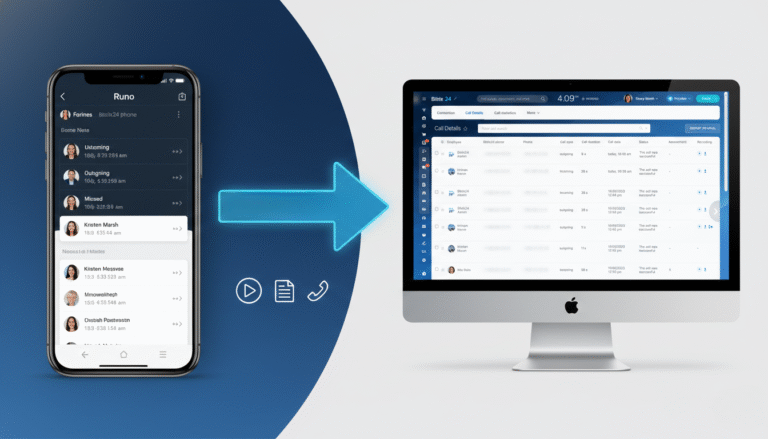
If you’re running a sales team, you know the frustration of missing data. Your reps make dozens of calls on their mobiles, but your CRM stays empty. At Sarasuk Tech, we bridge this gap with a professional Bitrix24 Callyzer integration. This setup ensures that every conversation is captured without your team having to lift a finger.
Why Your Business Needs a Bitrix24 Callyzer Integration
We tell our reps to log their calls. They say they will. But after a long day of selling, nobody wants to sit down and manually type out call times. It’s a waste of their talent.
When you integrate Callyzer with Bitrix24, the “work” of logging calls just stops existing.
-
The phone does the logging: Your team uses their Android phones exactly like they do now.
-
The CRM gets the data: Using the Bitrix24 REST API, every call—inbound, outbound, even missed ones—shows up in the CRM timeline instantly.
-
Recordings included: You don’t have to guess what was said. The recording is right there on the Lead/Deal card.
How We Actually Make It Work
As a Bitrix24 Gold Partner, we don’t just “link” the apps and walk away. We properly integrate your telephony with Bitrix24 to ensure a perfect sync of your communication data.
Once we set it up, the system automatically handles:
-
Call Syncing: Every incoming, outgoing, and missed call is logged instantly.
-
Lead Creation: New numbers automatically generate a new Lead so no prospect is forgotten.
-
Full Context: All call notes and recordings are attached directly to the CRM record.
By automating this, your team stops wasting time on manual data entry and you get a 100% accurate picture of your sales activity. That is how you actually make a process “easy.”
Quick Questions (FAQs)
Does this work for my team members with iPhones?
Short answer: No. Apple’s privacy rules are tight, so apps can’t “see” your call log. For iPhone teams, we usually look at Bitrix24’s built-in telephony or a cloud PBX. This Callyzer setup is the gold standard for Android users.
Will my reps have to use a different dialer?
Not at all. They use the standard phone app they’re already comfortable with. Callyzer works in the background.
What if the internet goes out while they’re on the road?
The data stays on the phone. Once they’re back on Wi-Fi or have a mobile signal, everything syncs up. You won’t lose a single call log.
Is it hard to set up?
For you? Yes. For us? No. We handle the API configurations and the webhook mapping so you just get the results. Usually, we can have a team up and running in a few days.
Stop Guessing. Start Tracking.
If you’re tired of “dark data” and want to see what’s actually happening on your team’s phones, let’s talk. We’ll show you how we’ve handled this for other clients.